GUIDE 03 · YOUR FIRST DOCUMENT
An invoice you understand.
A process you control.
Follow these simple steps to create and send your first invoice. Start once your MRA setup and subscription are active.
- 1
Add your customer
Open Customers and enter your customer’s name, address and any other details requested. Check that you have selected the right customer.
- 2
Prepare your invoice
Create an invoice, choose your customer and add the items or services, quantities, prices and VAT. Check the details and total before continuing.
The example below shows where your company details, customer details and amounts appear.
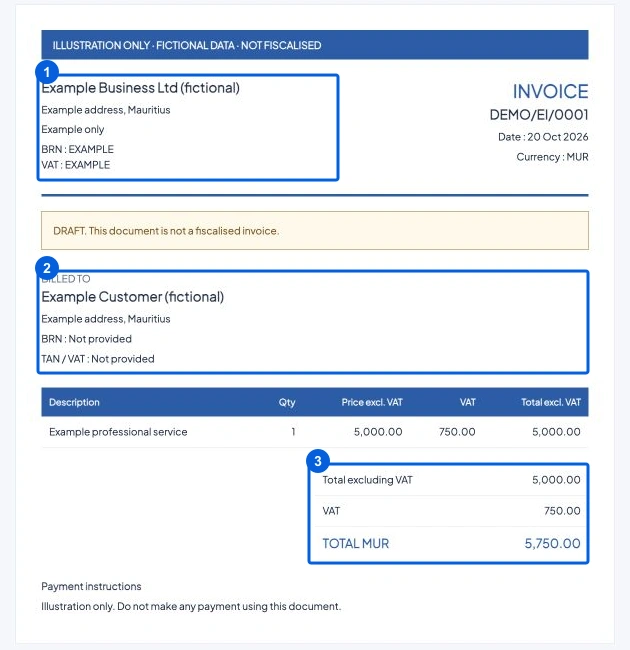
Example einv.mu invoice. The blue boxes show your company, your customer and the amounts. - 3
Send your invoice to MRA
Review the invoice and send it. einv.mu shows whether it was successful. If it was not successful, follow the message on screen and try again. If it is still processing, wait and check its status.
- 4
Download and share
Once successful, download the invoice PDF with its MRA QR code. Send it to your customer and keep a copy.
- 5
Make a correction if needed
To correct an invoice that has already been issued, create a credit note or debit note linked to that invoice. Enter the reason, check the amounts and send it.
Sources & review
Prepared by Streak Technologies LTD. Reviewed 20 October 2026. MRA screens can change; follow the current portal instructions.
YOUR NEXT STEP
Your business. Your invoices.
Your next chapter.
Rs 850 / month · VAT included · Self-service